
V-EMMC Tool v1.0 Updated Setup for Windows
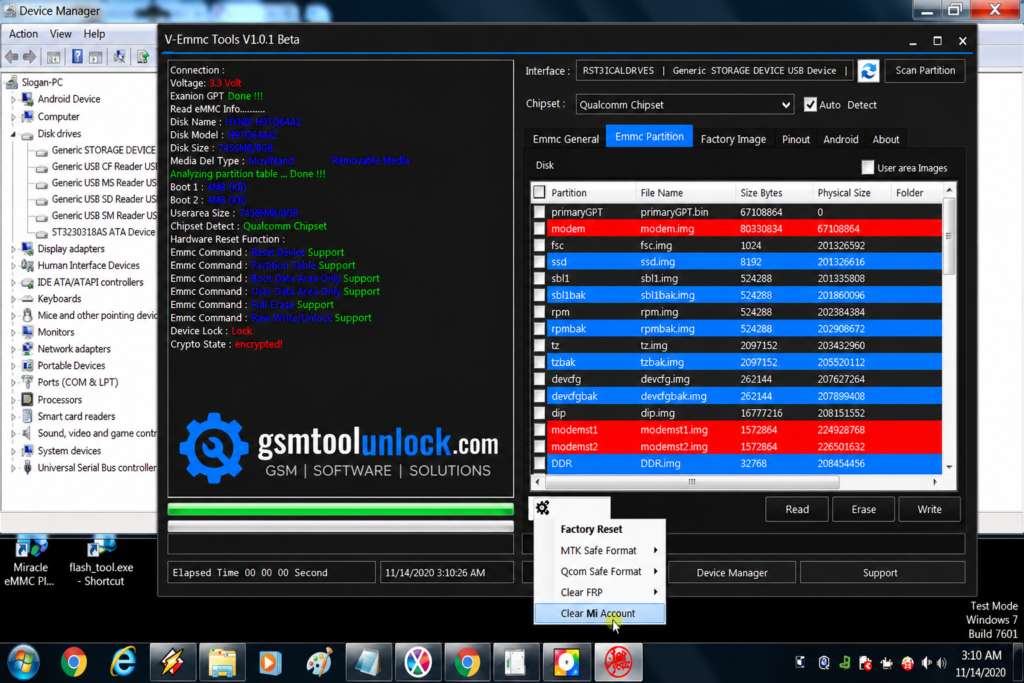
V-Emmc Tool is helpful for writing unnecessary files on eMMC devices. It is also helpful for sorting dead boot issues like repair dead boot, reset screen or FRP lock etc. it is designed for the help of technicians to solve the repair problems on Android devices.
What is V-EMMC Tool?
The Tool is designed to run on Windows-based applications. It is mainly used for repairing Android devices based on supported chipsets like Qualcomm and eMMC. It provides support for various devices such as Realme, Oppo, Vivo, and Samsung. It provides a user-friendly interface to help the user to perform operations within a few minutes.
Features of V-EMMC Tool
Flash Firmware
The Tool grants you the facility to install or flash firmware on your linked devices. It provides support for V-Emmc and Qualcomm chipsets.
Switch to DL mode
This feature provides help to the user by giving an opportunity to choose different modes in order to link them with your device and your PC for the purpose of repair.
Setting port
This feature is very important as it allows you to select a port, which is considered the best solution to set the port number according to your choice.
Easy Interface
This tool provides an easy and user-friendly interface. If a user has very basic knowledge of the tool can use it in an easy way. It includes simple navigation, and operations are easy to perform.
Read and write operations
This feature is very helpful as it provides read and write access to the eMMC partition in order to repair Android devices.
Dead boot repair
This tool helps you to deal with devices that are bricked or dead. It will facilitate the user to end their worries by giving them the opportunity to unlock and unbrick devices directly on eMMC chipsets.
Download Information
| File Name | V-Emmc Free Tool.zip |
| Version | v1.0 |
| File Size | 75.34 MB |
| File Password | None |
Also check: SN Write Tool v2.1408 Download
How to download?
- You can download V-Emmc Tool from GSM Tool Unlock or from another trusted source.
- Install the supported chipset drivers for your device, such as Qualcomm, ISP adapter driver, and MediaTek, etc.
- Click on the downloaded folder and open the tool.
- Now connect the eMMC chip using the ISP method.
- Click on Write User Area. Place your dump file there. Click on the Start option.
- Move to the eMMC partition. Click on Special Task and then on Factory Reset.
- Move to the eMMC partition. Click on Special Task. Now clear FRP.
Pros & Cons
Pros
- It provides a user-friendly interface.
- It is a Windows-based utility that is available for free.
- It provides support for numerous Android brands.
- It provides backup and restore partitions.
- It includes a fast repair process.
Cons
- Its compatibility relies on the model.
- It is designed for Windows only.
- It needs portable drivers like USB.
- A few functions require ISP hardware knowledge.
- Some functions can cause data loss.
Conclusion
The V-Emmc Tool is a Windows-based utility used to repair Android phones and tablets. It supports multiple devices such as Oppo, Realme, Vivo, and Samsung. It provides functions like firmware flashing, installing custom ROMS, unlocking screens, and bypassing FRP. The tool also offers setting the port number for the flashing option and selecting different modes. It has a simple, easy-to-use interface, designed for both beginners and professionals.
FAQ’s
Does V-Emmc Tool support Windows 11?
Yes. The tool is compatible with multiple Windows versions, including Windows 7, 8, 10, and 11.
Which phones are supported?
The tool supports multiple Android devices, including Samsung, Oppo, Vivo, Realme, Xiaomi, Qualcomm-powered devices, and other EMMC-based smartphones as well.
Can V-Emmc Tool repair a dead phone?
Yes. The tool can repair multiple software-bricked or dead devices by directly writing firmware to the EMMC chip through ISP.
Can it remove FRP?
Yes. The tool offers an FRP removal feature on various supported devices. Make sure that you have authorization to service the device.
Does it unlock screen locks?
Yes. The tool is compatible with unlocking PIN, password, and pattern locks on supported models.

One Comment