
RC Dark Tool V1.5.3 Free Download Setup 100% Working
Android repair work gets messy fast. You use one program for ADB, another for Fastboot, and another to read phone details. This wastes time. RC Dark Tool puts many of these jobs on one Windows screen. It includes sections for ADB, Fastboot, Samsung, and Xiaomi, plus an App Manager and a device information panel. Whether you’re an expert technician, mobile repair shop owner, or beginner, this lightweight tool helps you complete common Android repair tasks with just a few clicks.
What Is RC Dark Tool?
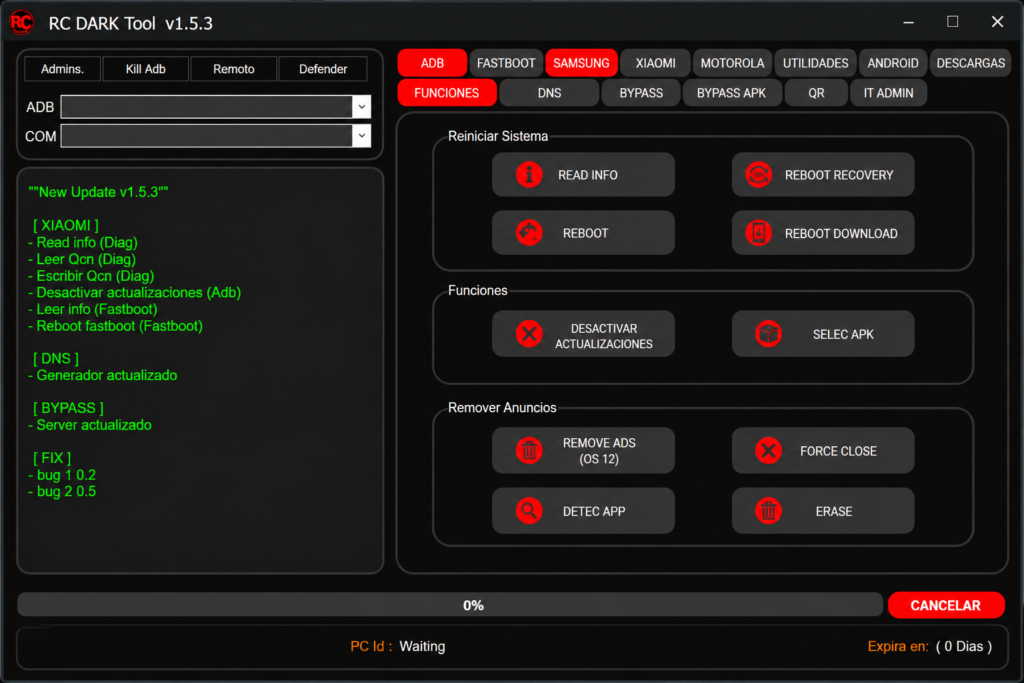
RC Dark Tool is a lightweight Windows program for Android servicing. It combines different service modules into one application, making device management more organized and convenient. It can show details like model, Android version, build number, serial number, One UI, and security patch. This makes routine Android servicing easier for technicians.
Features of RC Dark Tool
Device Information
This panel reads the phone’s model, device name, Android version, build number, and serial number. It also shows the One UI version, the security patch level, and the battery level and capacity. Reading these first tells you which method will fit.
ADB Functions
With ADB, you can read phone information, reboot to Recovery or Download Mode, and install APK files. An APK is an Android app file. You can also do basic service tasks from the same screen.
Disable System Updates
This Tool can turn off automatic updates on supported phones. It keeps the phone on its current software after servicing.
Magisk Installation
This tool lists an option to install Magisk 26.3 on supported phones. Rooting can void a warranty and may break banking apps, so think before you use it.
Remove Ads
This option removes system ads on supported Android 12 and newer phones. It can give a cleaner screen.
Samsung Functions
This section reads Samsung device information and supports Download Mode. Download Mode is the Samsung mode used for flashing firmware.
Xiaomi Functions
The Xiaomi section works through ADB and Fastboot. It can reboot the phone, enable DIAG mode, unlock the bootloader, and back up data. DIAG mode is a Qualcomm test mode. On supported Qualcomm phones, it can also back up QCN data. QCN holds network settings, including IMEI. Bootloader unlocking on Xiaomi phones may need approval from Xiaomi and can erase your data.
App Manager
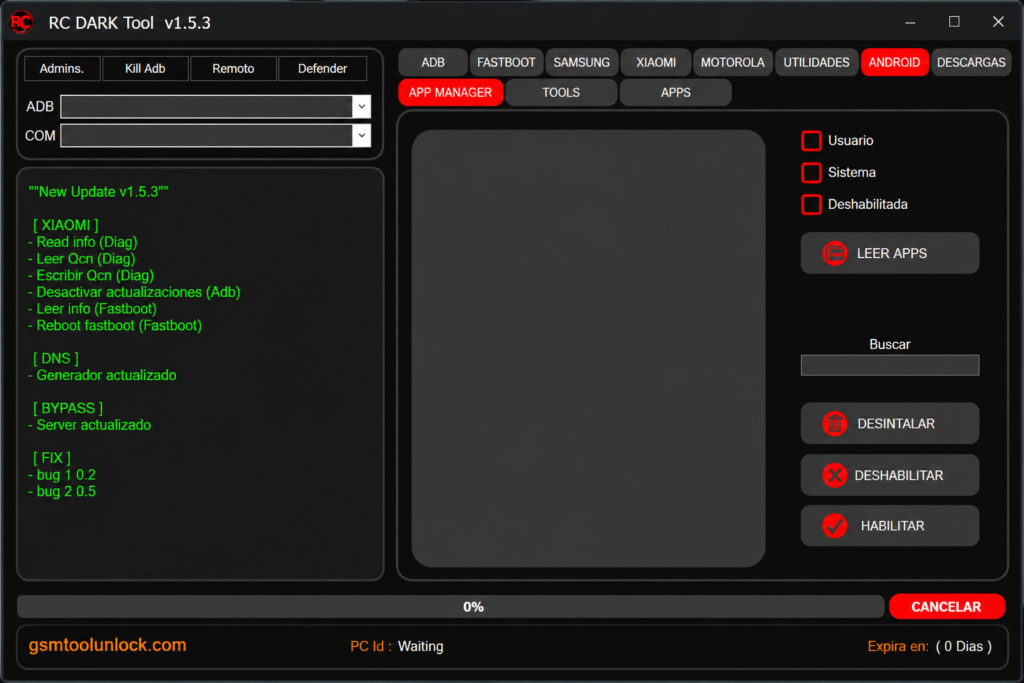
The App Manager shows all user apps and system apps in one list. You can uninstall or disable chosen apps without extra software.
Download Files
Pick a brand and a model, and the tool can download supported files. A progress bar shows how far the download has gone.
OEM Info Editor
This section edits some OEM information fields on compatible phones. Carrier and finance status labels are part of this. Only change this with the owner’s or lender’s permission, and never use it to dodge a payment plan.
What’s New in RC Dark Tool V1.5.3?
- IMEI Generator
- OEM Info Editor
- Remove Ads function
- FRP Key Unlock
- Android 15 FRP operations
- Better MediaTek support
- Better Qualcomm support
- Live logging to watch each step
- Encrypted Data Transfer on supported jobs
- Partition Backup and Restore on supported phones
Also read: OST Tool V6.3.7 Free Download Nokia Firmware (2027)
System Requirements
| Requirement | Minimum |
| Operating System | Windows 7, 8, 10, 11 |
| Architecture | 32-bit or 64-bit |
| RAM | 2 GB |
| .NET Framework | 4.0 or higher |
| USB | Working USB port and a good cable |
| Drivers | Android USB drivers for your phone |
How to Download, Install & Use RC Dark Tool V1.5.3
- Download RC Dark Tool from gsmtoolunlock or from a trusted site.
- Extract the ZIP or RAR file with 7-Zip or WinRAR.
- Scan the files with your antivirus.
- Run the setup and finish the Windows installation for the tool.
- Install the USB drivers for your phone.
- Connect your Android phone with a USB cable.
- Turn on USB Debugging if you want to use ADB.
- Open the module you need: ADB, Fastboot, Samsung, or Xiaomi.
- Choose a supported action and follow the on-screen steps.
- Wait for the process to end and check the phone.
Pros and Cons
Pros
- ADB, Fastboot, Samsung, and Xiaomi tools in one place
- Light and simple to open
- Shows useful device details
- App Manager and Remove Ads included
- Live logging helps you find problems
Cons
- Works only on Windows
- Some functions need root access
- Support changes by model and Android version
- Changed copies may have no official support
- Some modules need technical knowledge
Conclusion
RC Dark Tool brings ADB, Fastboot, Samsung, Xiaomi, and device information tools into one Windows screen. It saves time on routine checks, reboots, app control, and backups. The layout is simple, and live logging helps you see what is going on. But features change by phone model and Android version, and some options, like IMEI and OEM changes, carry legal risks. Back up your data, download from a trusted source, and service only phones you are allowed to repair.
FAQ’s
Does RC Dark Tool have an App Manager?
Yes. The App Manager can detect connected devices, list user and system apps, and provide options to uninstall or disable supported apps.
Does RC Dark Tool work with all Android brands?
No. It has Samsung and Xiaomi sections, and some sources list OPPO, Vivo, Realme, and Huawei. Some modules are brand-specific, so check yours first.
Does RC Dark Tool support QCN backup?
Yes. The Xiaomi Fastboot section includes QCN backup through DIAG mode on supported Qualcomm devices.
Does it work with all Android brands?
It supports Samsung, Xiaomi, OPPO, Vivo, Realme, Huawei, and LG. Some modules are brand-specific.
Can RC Dark Tool download device files?
Yes. Its Download File section provides brand, model, and file selectors with a download progress indicator.
One Comment