
Xsoft FRP Unlock Tool v2.2 Free Download for Windows [2026]
Is your Android phone stuck on a Google account screen after a reset? Or did you forget the screen lock? Phone repair shops meet this problem every day. Xsoft FRP Unlock Tool is a Windows program made for these issues. It helps with FRP, screen lock, and pattern lock on supported Samsung, Xiaomi, and other Android phones.
What Is Xsoft FRP Unlock Tool?
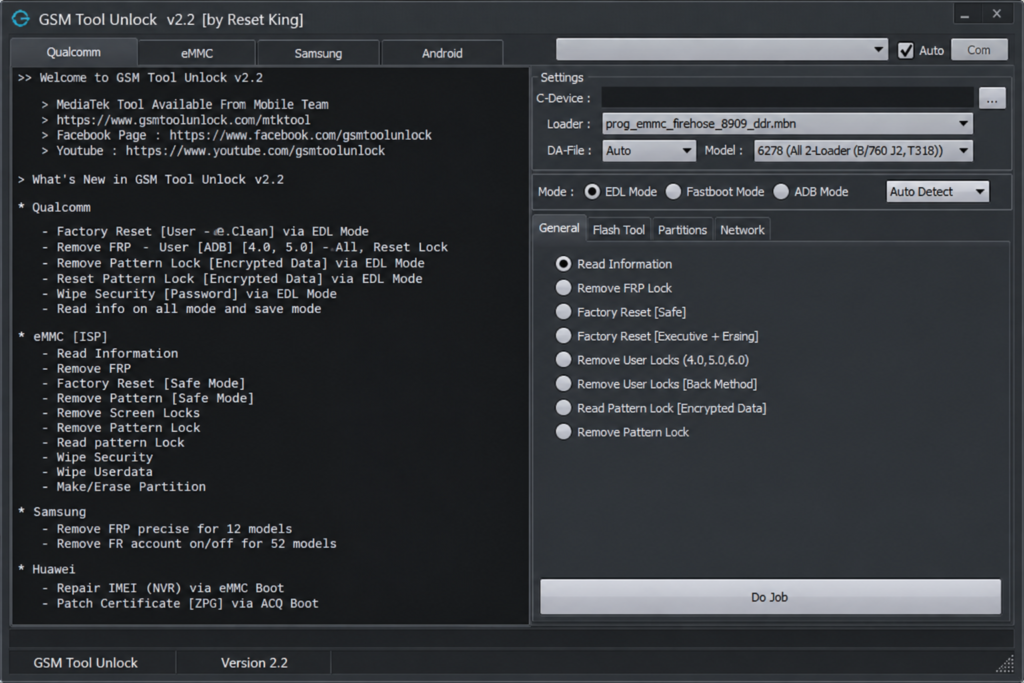
Xsoft FRP Unlock Tool is a Windows-based mobile servicing tool. FRP means Factory Reset Protection. It is a Google safety lock that asks for the old Google account after a phone is reset. This tool helps technicians handle FRP and other lock problems on supported phones. This tool has four tabs: Qualcomm, EMMC, Samsung, and Android. Each tab matches a chip or a job type. The tool works in EDL, Download, ADB, and Fastboot modes, and it can also use ISP for some jobs.
Features of Xsoft FRP Unlock Tool
FRP Servicing
The tool has FRP options for supported Android phones. What you see depends on your phone model, chip, and software version.
Qualcomm EDL Mode Support
For supported Qualcomm phones, the tool can run a factory reset in Emergency Download (EDL) mode. EDL mode is a low-level mode that lets the PC talk to the phone chip. Some phones need a test point to enter this mode.
Screen Lock and Pattern Lock Servicing
The tool lists user lock and pattern lock jobs for selected phones. It can also read gesture locks and write security files. Results depend on your phone and its security setup.
eMMC ISP Operations
For some phones, the tool can read storage information and manage partitions through eMMC ISP. It can also handle FRP and screen lock work this way. ISP jobs may need special hardware, such as an eMMC box, plus thin wires or a pin-out tool.
Multiple Connection Modes
The tool supports EDL, ADB, Download, Fastboot, and ISP modes. The mode you can use depends on the phone and the job.
Xiaomi and Samsung Functions
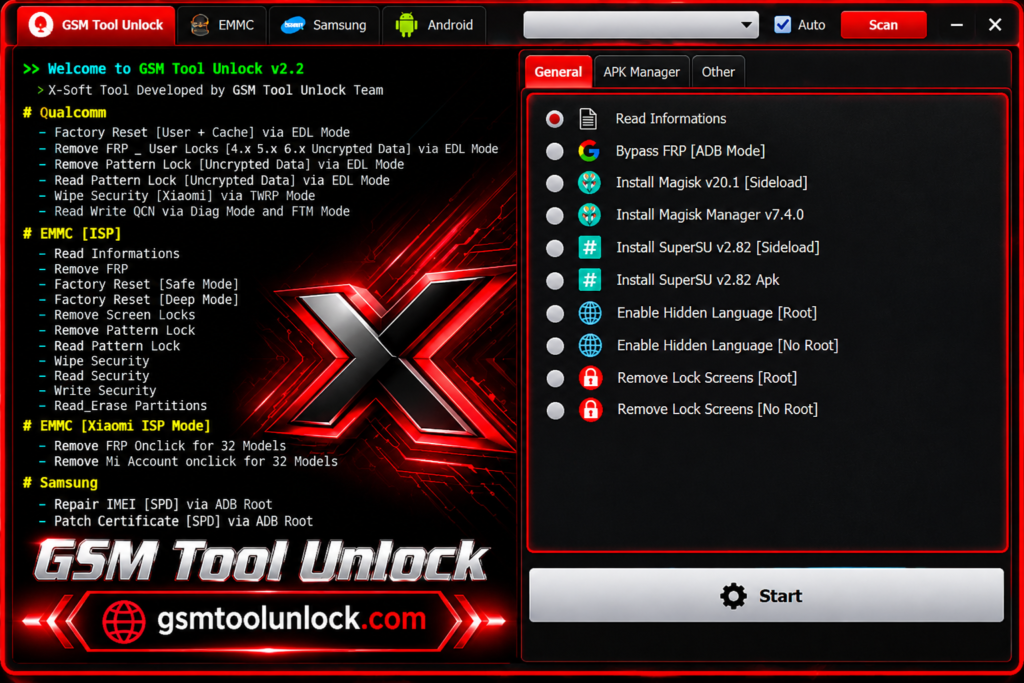
The tool lists Xiaomi ISP support for FRP and Mi Account work on some models. It also lists Samsung SPD (Unisoc) functions through ADB root, such as IMEI repair and certificate patching.
Wi-Fi Fix and QCN Read and Write
The tool also fixes some Wi-Fi problems. It can read and write QCN files through Diag and FTM modes on supported Qualcomm phones.
Windows-Based Utility
The tool runs on a Windows PC. You need the right USB drivers so the PC can see your phone.
Technician-Friendly Workflow
The layout is made for repair work. Basic Android knowledge helps a lot.
Android Version Support
Old methods may not work on phones with new security patches. Always check your phone’s Android version and patch level first.
What’s New in Xsoft FRP Unlock Tool?
- Qualcomm factory reset through EDL mode
- User lock and pattern lock jobs for supported Qualcomm phones
- eMMC ISP information reading and partition management
- FRP and screen lock servicing through eMMC ISP
- Xiaomi ISP support for FRP and Mi Account work on listed models
- QCN reading and writing through Diag and FTM modes
- Samsung SPD ADB-root functions for IMEI repair and certificate patching
Xsoft FRP Unlock Tool System Requirements
| Requirement | Details |
|---|---|
| Operating System | Windows 7, 8, 10, or 11 |
| Processor | Intel or AMD |
| RAM | 4 GB or more is a good starting point |
| USB Drivers | Drivers that match your phone and chip |
| Connection | A good USB data cable and the right device mode |
| Extra Hardware | ISP equipment, only for ISP jobs |
Xsoft FRP Unlock Tool File Information
| Detail | Information |
|---|---|
| Software Name | Xsoft FRP Unlock Tool |
| Version | v2.2 |
| Platform | Windows 7, 8, 10, and 11 |
| Chip Support | Qualcomm, eMMC, Samsung, and general Android Tab |
| Connection Modes | EDL, Download, ADB, Fastboot, and ISP |
Also Read: Factory Tool v5.30 Free Download Setup for Windows [2027]
How to Download, Install, and Use Xsoft FRP Unlock Tool
- Download the tool from GSMToolUnlock or from a trusted source.
- Check the version, system requirements, and supported phones first.
- Download the ZIP or RAR file to your Windows PC.
- Scan the file with good security software before you open it.
- Extract the file into a folder.
- Install the USB drivers for your phone and chip.
- Open the tool and wait for it to load.
- Connect your phone with a good USB cable in the right mode (EDL, Download, ADB, or Fastboot).
- Pick the tab that matches your phone: Qualcomm, EMMC, Samsung, or Android.
- Choose the job you need and follow the steps on the screen.
- Check the phone when the job ends.
Pros and Cons
| Pros | Cons |
|---|---|
| FRP options for supported phones | Support changes by phone, chip, and Android version |
| Qualcomm EDL mode support | Needs the right USB drivers |
| eMMC ISP and partition jobs | ISP jobs may need extra hardware |
| QCN read and write | Needs Diag or FTM mode for QCN |
| Xiaomi and Samsung functions | No confirmed model list |
Conclusion
This is a Windows tool for FRP, screen lock, Qualcomm EDL, and eMMC ISP work on supported Android phones. It can be useful for technicians who know their way around phone repair. Before you start, check your phone model, install the right drivers, and make sure you have permission to repair the phone.
FAQs About Xsoft FRP Unlock Tool
What is Xsoft FRP Unlock Tool?
It is a Windows-based mobile servicing tool for FRP, screen lock, and some partition and QCN jobs on supported Android phones.
Which phones does Xsoft FRP Unlock Tool support?
It supports Samsung, Xiaomi, OPPO, Vivo, Wiko, Motorola, and other Qualcomm-based phones. Support depends on the model, chip, and mode, so check before you start.
Does Xsoft FRP Unlock Tool support eMMC ISP?
Yes, it lists eMMC ISP jobs like reading storage info and managing partitions. These jobs may need special hardware and a good connection setup.
Which operating system does Xsoft FRP Unlock Tool need?
It is a Windows-based tool and supports Windows 7, 8, 10, and 11. You also need USB drivers for your phone.
Which connection modes does Xsoft FRP Unlock Tool use?
It uses EDL, Download, ADB, Fastboot, and ISP modes. The mode you can use depends on your phone and the job.
Does Xsoft FRP Unlock Tool work on new Android security patches?
Not always. Newer security patches can block older methods. Check the tool notes and test only on a phone you are allowed to repair.

One Comment