
MRT Tool V6.1.0 Free Download Setup for Windows [Latest 2027]
Is your Android phone stuck on a Google lock, a forgotten screen lock, or a failed update? Phone repair shops see this problem every day. MRT Tool is a Windows program that helps fix these problems on supported phones. It works with MediaTek, Qualcomm, and Unisoc (SPD) chips.
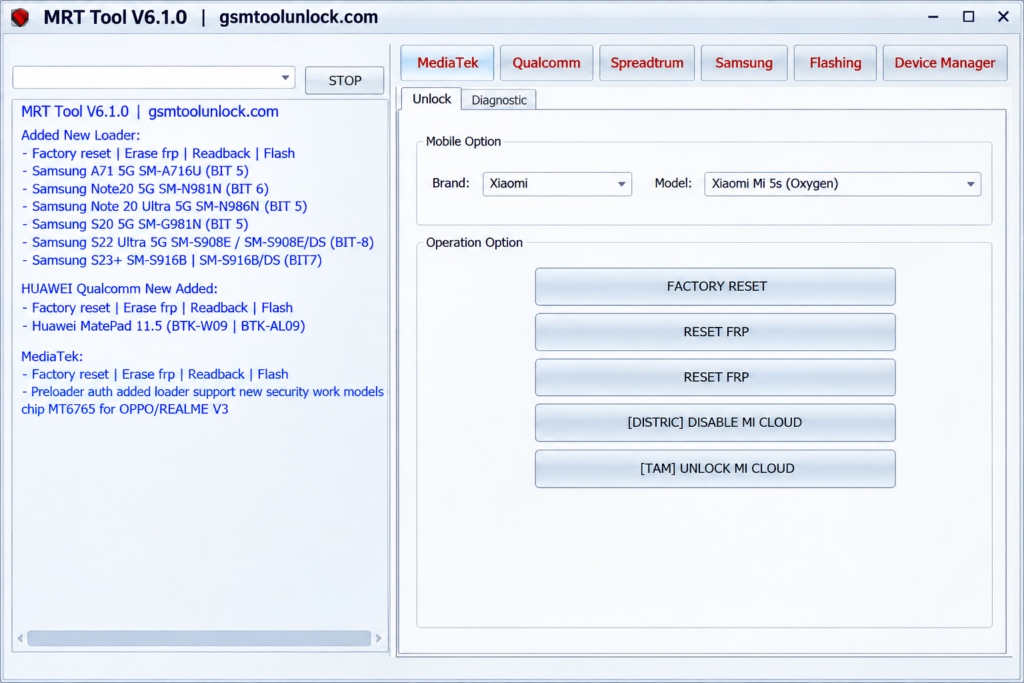
What Is MRT Tool?
MRT Tool is a Windows-based Android repair tool. It helps technicians flash firmware, reset phones, remove FRP locks, and repair software problems. It supports Chinese Android brands like Xiaomi, Oppo, Vivo, and Huawei. It also works with Samsung, Realme, Tecno, Infinix, and itel phones.
This tool talks to your phone in many modes, including ADB, Fastboot, Meta, Download, EDL (Qualcomm), and Preloader mode. In version 6, many jobs run automatically. The tool detects the loader or preloader by itself. For MediaTek phones, you still need to pick the right preloader mode.
Key Features of MRT Tool
Firmware Flashing
MRT Tool can flash stock firmware on supported phones. It helps with boot loops, stuck logos, and failed updates. The Flashing tab uses Scatter files for MediaTek and XML files for Qualcomm.
FRP Removal
This feature removes the Google account lock (FRP) after a factory reset. It works on supported MediaTek, Qualcomm, Unisoc, and Samsung phones. Use it for authorized servicing only.
Factory Reset
Wipe a phone to fix software problems or get it ready for a new owner. It runs in Meta, Download, EDL, and ADB modes on supported phones.
Screen Lock Removal
Clear a forgotten PIN, pattern, or password on supported models. The options you see depend on the brand and the chip.
Bootloader Unlock and Relock
Open or close the bootloader on supported phones. Use it when you want a custom ROM, or when you want to return a phone to a locked state.
Mi Cloud and Mi Account Tools
Disable or unlock Mi Cloud, and remove Mi Account, on supported Xiaomi, Redmi, and Poco phones.
IMEI, NV, and QCN Repair
Read, write, and back up network data on supported chips. This can fix some signal and baseband problems that come from software.
Device Information
Read key details from a connected phone, like its model and software data. This helps you pick the right function before you start.
ADB and Fastboot Support
Send commands from your PC to the phone in ADB and Fastboot modes. You can also reboot the phone to Download or Recovery mode.
Multi-Brand and Multi-Chip Support
MRT Tool works with MediaTek, Qualcomm, and Unisoc chips. It supports Xiaomi, Samsung, Oppo, Vivo, Realme, Huawei, Honor, Tecno, Infinix, and itel phones.
MRT Tool System Requirements
| Requirement | Details |
|---|---|
| Operating System | Windows 7, 8, 8.1, 10, or 11 (32-bit and 64-bit) |
| Processor | Intel or AMD dual-core or better |
| RAM | 2 GB minimum; 4 GB or more is better |
| Storage | At least 1 GB free space |
| USB Port | Working USB 2.0 or 3.0 port with a good data cable |
| Drivers | USB drivers for your phone and chip (Qualcomm, MediaTek, Unisoc) |
| Internet | Needed for login and updates |
| Permission | Run as administrator |
Download Information
| Detail | Information |
|---|---|
| Software Name | MRT Tool |
| Version | V6.1.0 |
| Category | Android Repair Tool |
| Platform | Windows |
| File Size | 112.40 MB |
| File Type | ZIP / RAR |
| License | Professional Utility |
| File Password | None |
Also Read: Odin Tool 3.14.4 latest version
How to Download and Install MRT Tool V6.1.0
- Download the MRT Tool V6.1.0 ZIP file from the button above or from a trusted source
- Save it to your Desktop.
- Right-click the ZIP file and choose Extract All, or use WinRAR or 7-Zip.
- Open the extracted folder and run the setup file as administrator. The install is quiet, so it may not show many windows.
- Install the USB drivers for your phone’s chip.
- Open the tool from your Desktop or Start menu. A login box will appear.
- New user? Go to mrttool.com/register.php. Enter an email, a username, and a password. Then log in inside the tool.
- Connect your phone in the right mode (EDL, Preloader, Download, ADB, or Fastboot).
- Choose the function you need and wait for the success message.
Tip: Charge the phone above 50% and back up your data first. A cut USB cable in the middle of flashing can damage the phone.
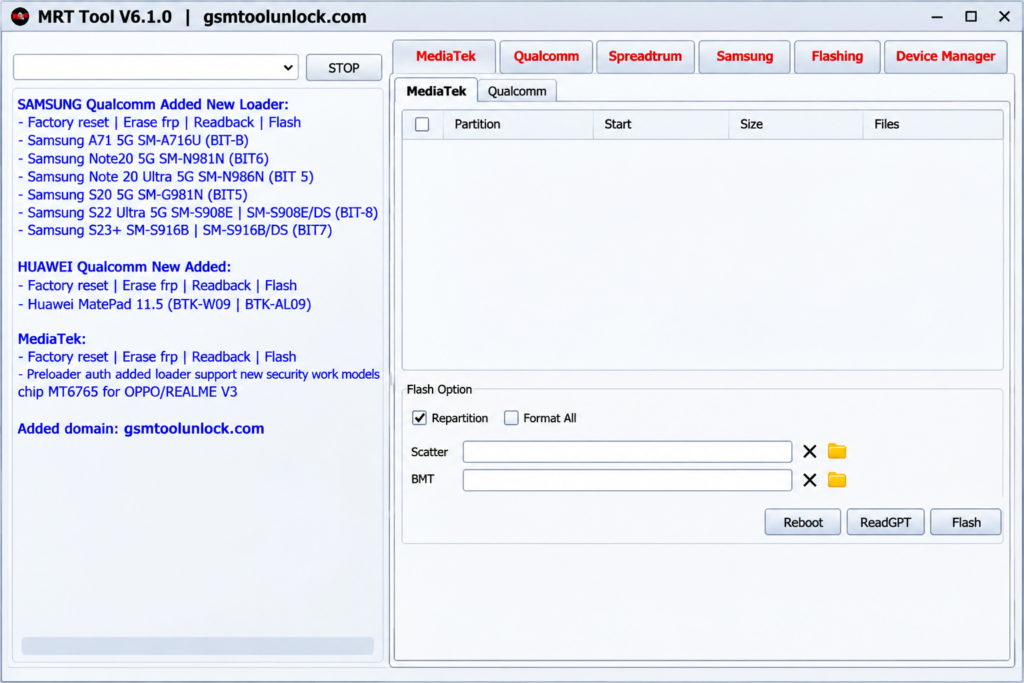
Pros and Cons
Pros
- Works with many brands and chips
- Flashing, FRP, reset, and IMEI in one tool
- Many automatic tasks
- Frequent loader updates
- Supports ADB and Fastboot modes
Cons
- Some features depend on the phone model
- May need exact USB drivers
- Some jobs need technical knowledge
- Some functions may need a dongle or paid plan
- Antivirus may block it
Conclusion
This tool is a handy Android repair program for technicians and careful home users. It handles flashing, FRP, factory reset, Mi Cloud, bootloader, and IMEI jobs on MediaTek, Qualcomm, and Unisoc phones. Version 6.1.0 adds more Xiaomi, Samsung, and Huawei loaders. Before you start, check your phone model, the right drivers, and the license rules on the official site.
FAQ’s
What is MRT Tool used for?
It helps flash firmware, reset phones, remove FRP locks, fix IMEI, and manage bootloaders on supported Android phones.
Is MRT Tool free?
Version v6.0 offers a free one-year account after you register. Others say some functions need a dongle or key. Check mrttool.com for the current offer.
Does MRT Tool support MediaTek and Qualcomm phones?
Yes. It supports MediaTek, Qualcomm, and Unisoc (SPD) phones, plus ADB and Fastboot jobs. Support depends on the model and security version, so check the list before you start.
Can MRT Tool remove FRP?
Yes, on supported phones. It has FRP options for MediaTek, Qualcomm, Unisoc, and Samsung. Use it only on phones you own or have permission to repair.
Why is MRT Tool not opening?
Antivirus software may block it, or you may be using an old version. Remove the old version, turn off or allow it in your security app if you trust the file, run as administrator, and install again.

One Comment