
Griffin Unlocker Tool V2026.07.10 Latest Version – Free Download & Features
Android and iPhone problems can stop you from using your phone. A forgotten screen lock, an FRP lock, a SIM lock, or a broken system can all cause trouble. Technicians often use many different programs to fix these problems. The Griffin Unlocker Tool brings many of these jobs into one Windows program.
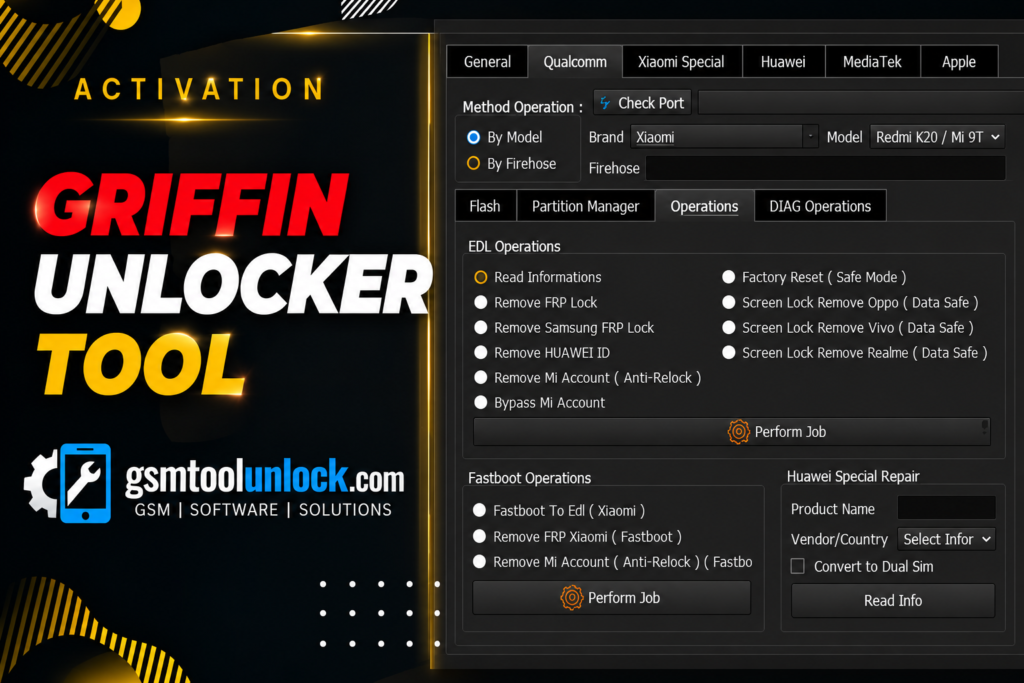
What Is the Griffin Unlocker Tool?
Griffin Unlocker Tool 2026.07.10 is a professional Windows-based mobile servicing software designed to repair and manage Android and Apple iOS devices. Technicians use it to read phone information, repair software, and manage locked devices. It works with multiple brands like Samsung, Xiaomi, Vivo, OPPO, Huawei, Google Pixel, LG, and Motorola phones. It also supports Qualcomm, MediaTek (MTK), and Unisoc (SPD) chips.
Key Features of Griffin Unlocker Tool 2026
Device Information Reading
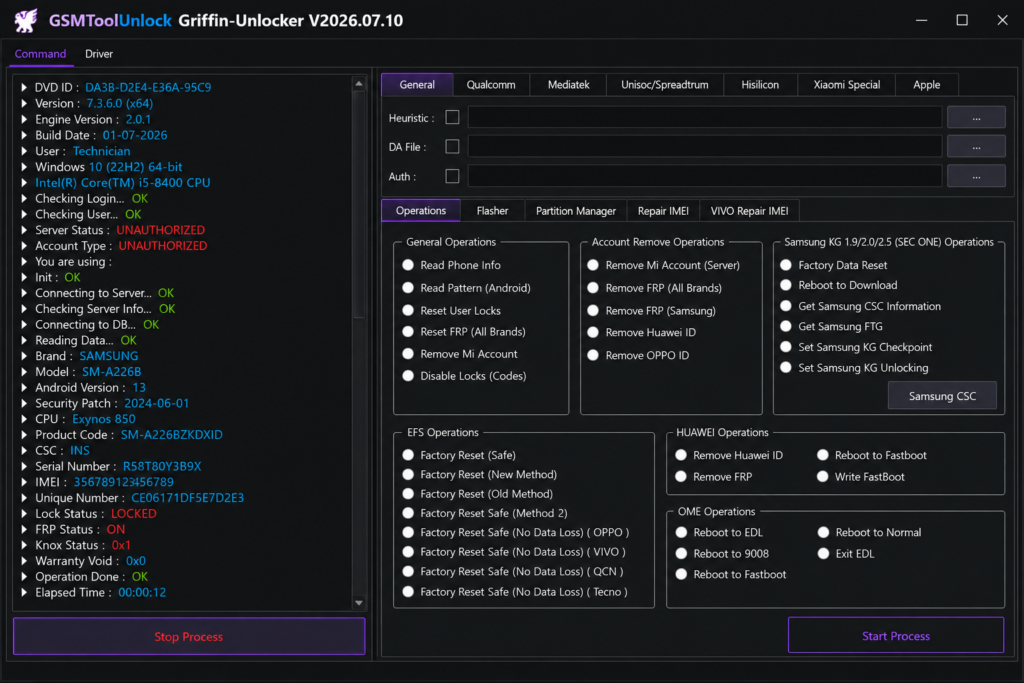
The tool reads the phone model, chipset, Android version, build number, and serial number. Reading this first helps you pick the right repair step.
ADB Functions
ADB means Android Debug Bridge. It lets your PC talk to your phone. With ADB, you can detect a phone, reboot it to Recovery, and install APK files.
Fastboot Functions
Fastboot is a special mode used before Android starts. In this mode, the tool can read bootloader details and reboot the device.
FRP Removal
FRP means Factory Reset Protection. Google added it in Android 5.1 Lollipop in 2015 to protect lost or stolen phones. If a phone is reset and the owner’s Google account is not known, it stays locked. Technicians use FRP features to help real owners who forgot their login. The Griffin Unlocker Tool offers FRP options for supported Samsung, Xiaomi, Huawei, MediaTek, and Qualcomm phones.
Factory Reset
A factory reset wipes the phone and brings it back to its clean state. It helps with frozen phones or heavy software errors. Remember, a reset deletes your data, so always back up first.
Auth and Security Functions
The tool lists options such as Auth Bypass, DAA/SLA, MDM removal, and Demo Mode removal on compatible devices. MDM stands for Mobile Device Management, which companies use to control work phones. These features are for authorized service only.
Samsung Functions
For Samsung phones, the tool can detect the device and use Download Mode, also known as Odin mode. It also lists FRP, KG, and firmware-related tasks on supported models.
MediaTek Functions
MediaTek phones use a boot mode called BROM. The Griffin Unlocker Tool can read information and run flashing and repair jobs on selected MTK models.
Qualcomm Functions
Qualcomm phones use EDL, short for Emergency Download Mode, also called 9008 mode. This mode helps repair phones that will not turn on. The tool supports Qualcomm devices in EDL and other supported modes.
Firmware Flashing and Extraction
Firmware is the main software of your phone. Flashing means installing a fresh copy. The Griffin Unlocker Tool can flash stock firmware and extract firmware packages from supported brands. This helps with boot loops and system recovery.
Partition and IMEI/EFS Tools
Partitions are the sections of storage inside a phone. The tool can read partitions and system data. It also lists IMEI and EFS servicing, which restores network data when it is damaged. Always follow your local laws about IMEI work.
Apple iPhone Support
The tool lists selected iCloud, MDM, and DFU-related servicing for some Apple models. Apple security is strict, so support is limited and depends on the model and iOS version. Only service iPhones you own or have proof of ownership for.
Download Information
| Detail | Info |
| Tool Name | Griffin Unlocker Tool |
| Version | V2026.07.10 |
| File Size | 167.18 MB |
| Platform | Windows |
| License | Account or license needed for some features |
Also check: TFT Unlock Tool v6.2 Free Download Setup
What’s New in Griffin Unlocker Tool?
Version V2026.07.10 brings these updates:
- Bug fixes and better speed
- Better Android security compatibility
- Improved Samsung KG operations
- Stronger FRP support
- Updated Qualcomm and MediaTek functions
- Better firmware extraction
- Improved device detection and connection stability
- Better error messages while a job runs
System Requirements
| Requirement | Minimum |
| Operating System | Windows 7 / 8 / 10 / 11 |
| Architecture | 32-bit / 64-bit |
| RAM | 4 GB |
| Storage | 500 MB or more free |
| .NET Framework | 4.0 or higher |
| USB Drivers | Android, MediaTek, Qualcomm, Samsung |
| Connection | USB port and internet |
How to Download, Install & Use Griffin Unlocker Tool V2026.07.10
- Download the setup from the official website or a trusted source.
- Extract the ZIP or RAR file.
- Install the USB drivers for Samsung, Qualcomm, MediaTek, or Android.
- Right-click the setup and choose Run as administrator.
- Open the Griffin Unlocker Tool.
- Log in with your active account.
- Connect your phone with a good USB cable.
- Turn on USB Debugging if you plan to use ADB.
- Select the brand and the repair function you need.
- Wait until the tool finishes. Do not unplug the cable.
Pros and Cons
Pros
- Many Android and iOS jobs in one place
- Supports Qualcomm, MTK, and Unisoc
- No dongle or box needed
- Simple interface for beginners
- Firmware flashing and extraction
Cons
- Some features need a paid license or activation
- Works only on Windows
- Support changes by device model and security patch
- Advanced tasks need technical knowledge
- Needs internet and an active account
Conclusion
The Griffin Unlocker Tool gives technicians one place for FRP, firmware flashing, bootloader control, MDM, and device information. It works with Qualcomm, MediaTek, and Unisoc phones, and with many top brands. It is easy to use, but results depend on your phone model, Android version, and security patch. Back up your data, use the right drivers, and service only phones you are allowed to repair.
FAQ’s
What is Griffin Unlocker Tool used for?
It is used for mobile servicing jobs. These include FRP help, firmware flashing, MDM removal, IMEI repair, bootloader work, and reading device information.
Is Griffin Unlocker Tool free?
The setup file can be downloaded easily, but many main features need an active account or a paid license. Always check the current price on the official source.
Does Griffin Unlocker Tool support Samsung phones?
Yes. It supports Samsung detection, Download Mode, FRP, KG, and firmware tasks on selected models.
Does Griffin Unlocker Tool support MediaTek and Unisoc devices?
Yes. It supports selected MediaTek and Unisoc phones for flashing, repair, and device reading.
Can Griffin Unlocker Tool repair Qualcomm devices?
Yes. It works with Qualcomm phones through EDL (9008) mode and other supported modes.
Does Griffin Unlocker Tool support iPhone devices?
It lists limited Apple servicing features. Support depends on the iPhone model and iOS version.

One Comment