
TPS Tool v3.1 Review | FRP, Flashing & Screen Unlock Guide (2027)
TPS Tool is designed to help users solve problems like repair, unlocking, and maintenance of devices. It is a Windows-based utility that provides support for multiple chipsets like Qualcomm, MediaTek, and SPD (Spreadtrum). It provides various features, for instance, FRP removal, screen lock bypass, firmware flashing, and IMEI repair, etc.
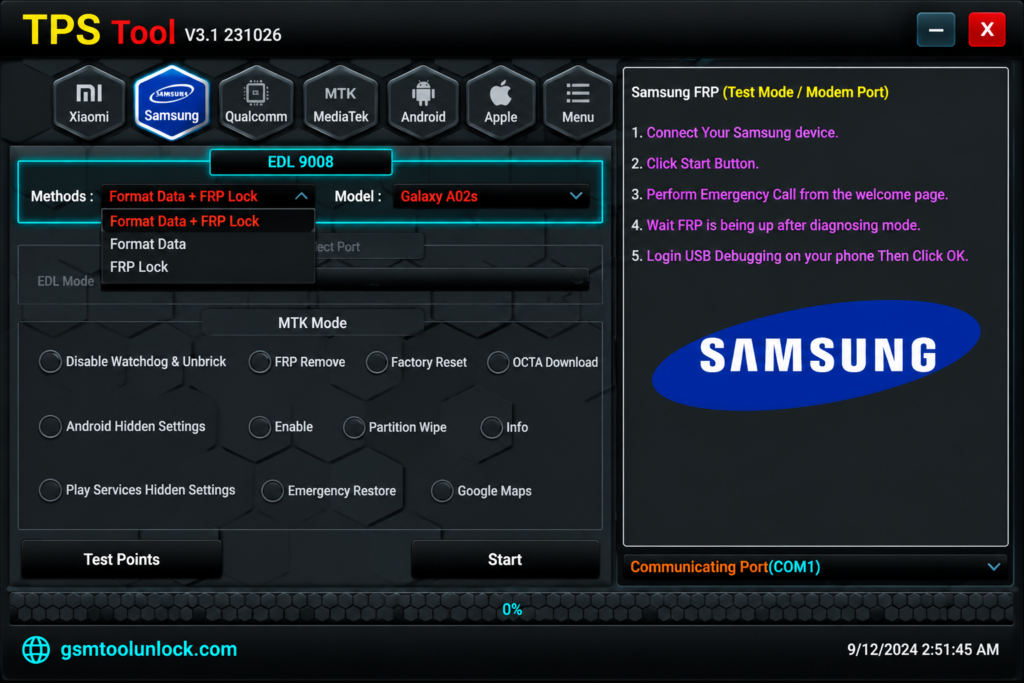
What is TPS Tool v3.1?
TPS Tool is especially designed for Windows to perform various functions related to Android repair. It provides a communication platform among Android devices via download mode, sort of chipset communication, Fastboot and ADB.
Features of TPS Tool v3.1
FRP Unlock
FRP, or Factory Reset Protection, gets activated after a reset. It is a security feature that is helpful to erase multiple FRP Locks on Different Android Devices. It is supported to Samsung, Vivo, Xiaomi, Vivo and other devices etc.
Screen Lock Removal
It is helpful to tackle certain screen lock problems like Pattern unlock, screen lock bypass, password removal and PIN removal, etc.
Firmware Flashing
Corrupted firmware can be problematic and a cause of software failure and bootloop crash. It supports device restoration, bootloop fixing, system recovery and repair, etc.
Factory Reset & Data Wipe
This tool provides an opportunity for users to reset different Android devices at the time of need and remove all the data. It helps to resolve software errors, bootloop recovery, system cleanup, and performance issues.
Bootloader Unlocking
It provides different features for Android devices, one of which is bootloader unlocking. It is helpful in the preparation of custom ROMs, advanced device modification, and bootloader repair.
Download Information
| Tool name | TPS Tool |
| Version | V3.1 |
| File Size | 189.47 MB |
| File type | ZIP/RAR Archive |
| Supported Platform | Window 7/8/10/11 (32-Bit &64-Bit |
| Developer | TPS Team |
Also read: AMF Tool V1.2.5
How to download and install?
- You can download TPS Tool from GSM Tool Unlock.
- Extract the ZIP with the help of WinRAR or 7-ZIP.
- You are required to install the relevant driver.
- Run the tool as administrator.
- Connect the device with USB.
- The tool is ready for use.
Pros & Cons
Pros
- It has an easy and user-friendly interface.
- It provides support for different Android devices.
- It is helpful for many chipsets.
- It has immediate operation speed.
- It is light in weight.
Cons
- Technical knowledge may be required for some functions.
- Manufacturers do not provide legal support.
- Antivirus may provide incorrect alerts.
- It provides limited documentation.
- Some versions may cause data loss.
Conclusion
TPS Tool v3.1 is a Windows-based utility that supports Samsung, Xiaomi, Redmi, POCO, OPPO, Vivo, Realme, Qualcomm-supported devices, MediaTek (MTK), and Unisoc (SPD) chipsets. It includes multiple features, including FRP removal, firmware flashing, screen lock removal, IMEI repair, bootloader operations, factory reset, and ADB/Fastboot functions, making it the best tool for servicing devices.
FAQ’s
Is TPS Tool v3.1 free to use?
The tool offers multiple features for free; however, multiple features require activation or a subscription.
Does TPS Tool v3.1 work offline?
Yes. Most of the features can be used offline, while many features require internet to function properly.
Which Android versions are supported by TPS Tool v3.1?
According to various sources, TPS Tool v3.1 supports multiple devices, including Android 11, Android 12, Android 13, Android 14, and Android 15 versions, depending on the model and security patch level.
Is TPS Tool v3.1 safe to use?
The tool is primarily used by mobile experts. It is safe to use when installed from a trusted source.
Does the tool requires drivers to function correctly?
Yes, the tool requires supported drivers to function correctly. it requires standard Android USB and platform-specific drivers
Which devices and chipset does the tool support?
The tool is compatible with wide range of devices and chipsets including Samsung, Xiaomi, Redmi, POCO, OPPO, Vivo, Realme, Qualcomm-supported devices, and MediaTek (MTK), and Unisoc (SPD) chipsets.


One Comment