
DFT Pro Tool V8.1.0 Download for Windows – Latest Version 2027
A technician needs many skills for one Android repair job: reading device info, working with Samsung’s Download Mode, handling a MediaTek chip, and fixing an FRP lock. DFT Pro Tool combines all these work into one Windows program. It supports Samsung, Xiaomi, Huawei, OPPO, Vivo, and Realme phones, across Qualcomm and MediaTek chipsets.
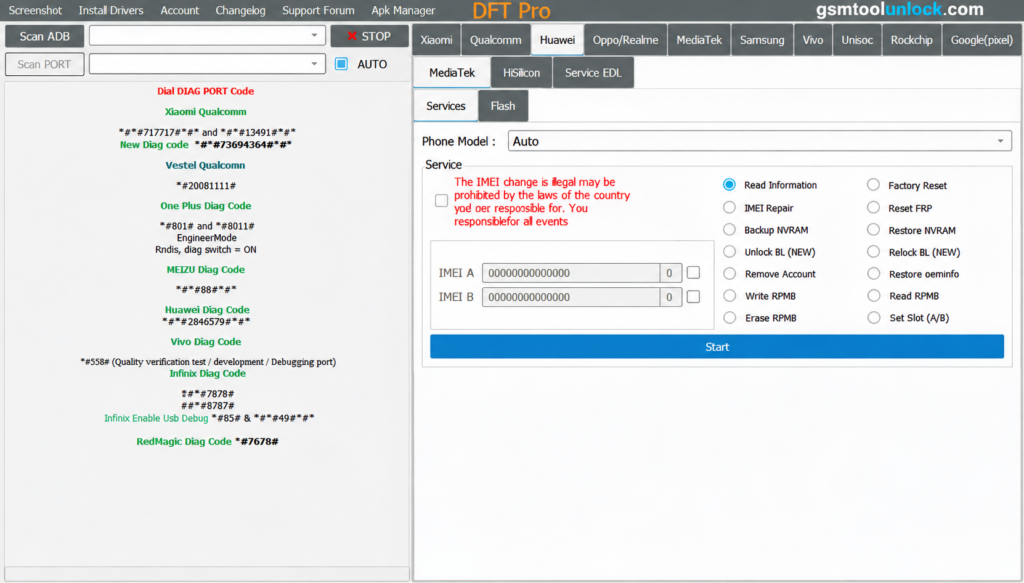
What Is DFT Pro Tool?
DFT Pro Tool is a Windows-based Android servicing program. It connects to phones through modes such as ADB, Fastboot, Meta, BROM, and EDL. It can read device information and offer services for FRP, bootloader, firmware, and IMEI. This tool is a paid, licensed program. It is common for professional-grade GSM tools, since the makers keep updating it to match new phone security.
Features of DFT Pro Tool
Device Information
The tool reads the phone’s model, chipset, Android version, build number, serial number, and security patch. This helps technicians confirm the right phone and the right method before starting.
ADB Functions
With ADB, technicians can detect connected phones, read device info, reboot to Recovery or Bootloader Mode, install APK files, and run other supported service tasks.
Fastboot Functions
This tool can read device info, reboot the phone, and check bootloader details on supported models.
Samsung Functions
This feature covers Samsung device info reading, Download Mode support, and FRP-related operations for compatible models.
MediaTek Functions
Depending on the phone’s model and security level, the MediaTek module works through BROM Mode, Preloader Mode, and Meta Mode for supported service jobs.
Qualcomm Functions
The Qualcomm module can detect compatible devices, read their information, and run supported service and software operations.
FRP Functions
DFT Pro Tool offers FRP servicing that depends on the phone model, Android version, chipset, and security update. Use this only for real owners who forgot their login.
Firmware Functions
The tool can flash firmware on supported phones, which helps fix boot loops and corrupted software.
Screen Lock and Pattern Unlock
If a customer forgets their pattern, PIN, or password, this feature can help unlock the screen on supported models.
Mi Cloud and Multi-Brand Support
The tool lists Mi Cloud unlock support and works across Xiaomi, Redmi, Nokia, Huawei, Honor, OPPO, Realme, and Vivo phones, alongside Samsung.
RPMB and EFS
RPMB is a secure storage area that some phones use for sensitive data. EFS stores network settings, including IMEI. The tool lists options to work with both when a software issue affects them.
What’s New in DFT Pro Tool V8.1.0?
- Better device detection
- New Samsung servicing options
- Improved MediaTek and Qualcomm functions
- Enhanced ADB and Fastboot functions
- Better FRP functions for supported devices
- Improved device information reading
- Updated firmware servicing functions
- More stable device connections
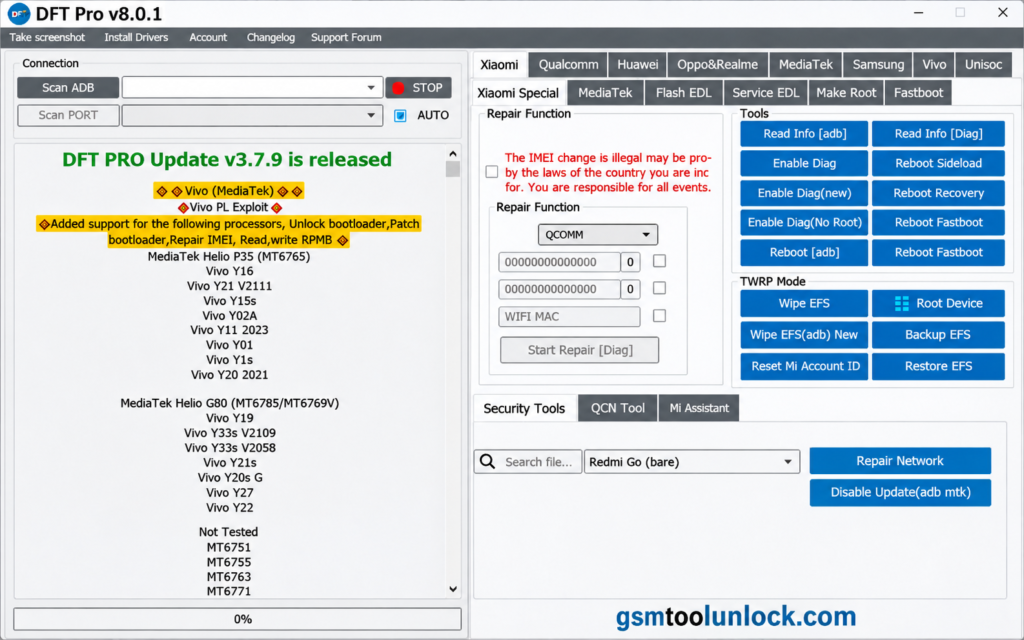
Earlier updates (V7.0.0) also added IMEI repair for newer Xiaomi and Redmi models (root required), a SELinux permissive option in the Fastboot tab for devices with security patches before February 2026, a hidden root system, and Xiaomi Qualcomm loader support, plus an added warning before UFS-related flashing.
Pricing and Licensing
DFT Pro Tool is not free. Reported pricing includes:
| Plan | Price |
|---|---|
| 1-year license | About $80 |
| 24-hour rental | About $5 |
| 48-hour rental | About $8 |
There is no free trial. Prices and plans can change, so always confirm current pricing on the official site before you buy.
System Requirements
| Requirement | Minimum |
|---|---|
| Architecture | 32-bit / 64-bit |
| RAM | 4 GB |
| Storage | 500 MB or more |
| .NET Framework | 4.0 or higher |
| USB Drivers | Android, MediaTek, and Qualcomm drivers |
| Connection | USB port for the Android device |
| Internet | Needed for some online functions and license checks |
Download Information
| Detail | Info |
|---|---|
| Tool Name | DFT Pro Tool |
| Latest Version | V8.1.0 |
| File Size | Varies by version (around 60 MB on older builds) |
| Platform | Windows (32-bit and 64-bit) |
| License | Paid; yearly license or short-term rental |
| Main Use | Samsung, Xiaomi, MediaTek, and Qualcomm servicing |
Also Read: Xiaomi Tool V2026.01.18 Free Setup
How to Download and Install DFT Pro Tool
- Download the setup from a trusted source or from the official site.
- Extract the ZIP or RAR file with WinRAR or 7-Zip.
- Scan the files with your antivirus.
- Install the required USB, MediaTek, and Qualcomm drivers.
- Run the installer and follow the on-screen steps.
- Launch the tool as Administrator.
- Turn on USB Debugging in your phone’s Developer Options.
- Connect your phone with a USB cable.
- Choose the brand, chipset, and the service you need.
- Put the phone in the required mode (ADB, Fastboot, BROM, or EDL) and let the tool detect it.
Pros and Cons of DFT Pro Tool
Pros
- Covers Samsung, Xiaomi, Huawei, OPPO, Vivo, Realme
- ADB, Fastboot, BROM, EDL, and Meta modes in one tool
- FRP, firmware, IMEI, and bootloader tools together
- Simple interface for beginners and experts
- Frequent updates for new devices
Cons
- Needs a paid license; no free trial
- Windows-only; no Mac or Linux version
- Some functions need specific drivers or test points
- Advanced operations need technical knowledge
- May not support every brand, such as OnePlus
Conclusion
DFT Pro Tool brings Samsung, Xiaomi, MediaTek, and Qualcomm servicing into one Windows program. It covers device info, ADB, Fastboot, FRP, firmware, IMEI repair, and bootloader work. It is a paid tool with no free trial, so weigh the yearly license against a short rental based on how often you repair phones. Install the right drivers, follow the setup steps carefully, and service only phones you are allowed to repair.
FAQ’s
1. Is DFT Pro Tool free to use?
No. It needs an active license or rental. Reported pricing is about $80 for a one-year license, or short rentals around $5 for 24 hours and $8 for 48 hours. Some features may also depend on the version and service.
2. What devices does DFT Pro Tool support?
It supports Samsung, Xiaomi, Redmi, Huawei, Honor, OPPO, Realme, and Vivo phones with Qualcomm and MediaTek chipsets. Support for each brand depends on the exact model and security patch.
3. Can DFT Pro Tool remove FRP?
Yes, FRP service is available for supported devices. Results depend on the model, Android version, chipset, and security update. Use this only for real owners.
4. Can DFT Pro Tool repair IMEI?
Yes, IMEI repair is available for compatible phones, including a newer option for some Xiaomi and Redmi models that needs root access. Only do this where your local law allows it.
5. Why is my device not detected by DFT Pro Tool?
This is often caused by missing or incorrect USB drivers, an unsupported connection mode, a faulty cable or port, device security settings, or an unsupported model.
6. Does DFT Pro Tool work on Mac or Linux?
No. It is a Windows-only program. Mac and Linux users would need a Windows PC or a virtual machine to run it.
7. Is DFT Pro Tool easy to use for beginners?
Yes, the interface is simple and well organized, though advanced features like partition repair or bootloader unlocking work best with some technical knowledge.


One Comment